Create Strong & Memorable Passwords with Our Passphrase Generator Online
Create secure and easy-to-remember passphrases in seconds with our Passphrase Generator. Generate unique word combinations for…
Need a new PIN for an account, device, or personal use? Our PIN Generator creates random PINs instantly, so you can get a fresh code without thinking of one yourself.
Generate cryptographically random, custom security PINs instantly in your browser.
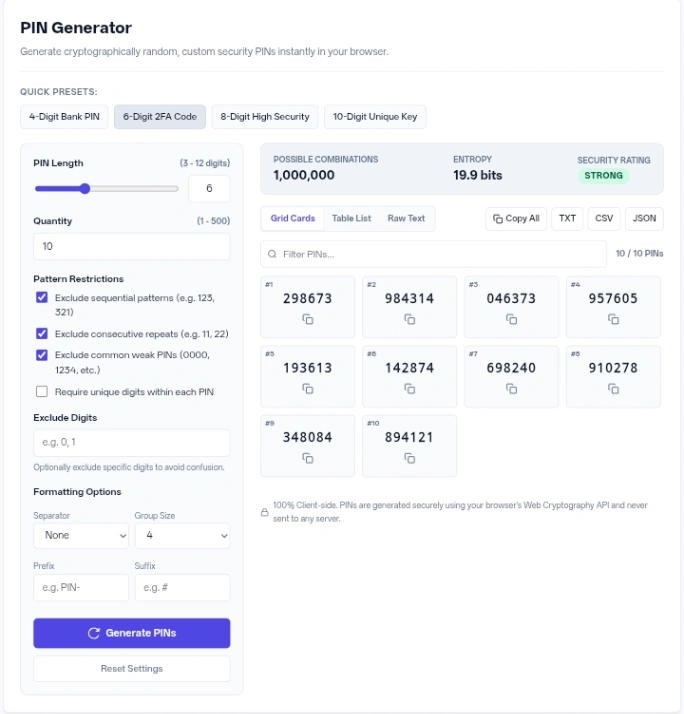
Setting up your codes takes just a few clicks using the control panel on the left side of the PIN Generator screen.
Four Quick Presets sit at the top of the interface, letting you instantly load configurations for a 4-Digit Bank PIN, 6-Digit 2FA Code, 8-Digit High Security code, or 10-Digit Unique Key. This saves time when you need standard formats without adjusting individual sliders and checkboxes.
The tool supports bulk extraction through dedicated export buttons. You can click Copy All to send the entire batch to your clipboard, or grab the data as a TXT, CSV, or JSON file for easy integration into spreadsheets or testing environments.
A built-in live filter helps you navigate large batches. Typing in the Filter PINs… box immediately narrows down the visible cards or table rows, while a counter updates to show how many matches remain out of your total generated set.
Behind the scenes, this tool relies on your browser’s Web Cryptography API to select numbers. It evaluates the strength of your current settings by calculating the possible combinations based on the allowed digits and length, displaying this as an Entropy rating measured in bits using the formula: Entropy = log2(Combinations).
The tool places your configuration into one of four security tiers based on that entropy score. Ratings below 12 bits are marked Weak, 12 to 18 bits are Standard, 18 to 25 bits earn a Strong badge, and anything above 25 bits is labeled High Security.
If you require unique numbers within each code, the combinations formula changes from standard exponentiation (N^L) to factorials to account for the shrinking pool of available digits. A safety limit prevents your browser from freezing if you create conflicting rules: the generator makes a maximum of 1,000 internal attempts per requested code before stopping and displaying how many valid numbers it managed to find.
Event entry passes Input: Set length to 6, choose a dot as the Separator with a Group Size of 3 -> Action: Click generate -> Result: A list of passes formatted like “824.915”.
Custom branded keys Input: Add “VIP-” as the Prefix and “#” as the Suffix, leaving the length at 5 -> Action: Click generate -> Result: Formatted strings such as “VIP-84021#”.
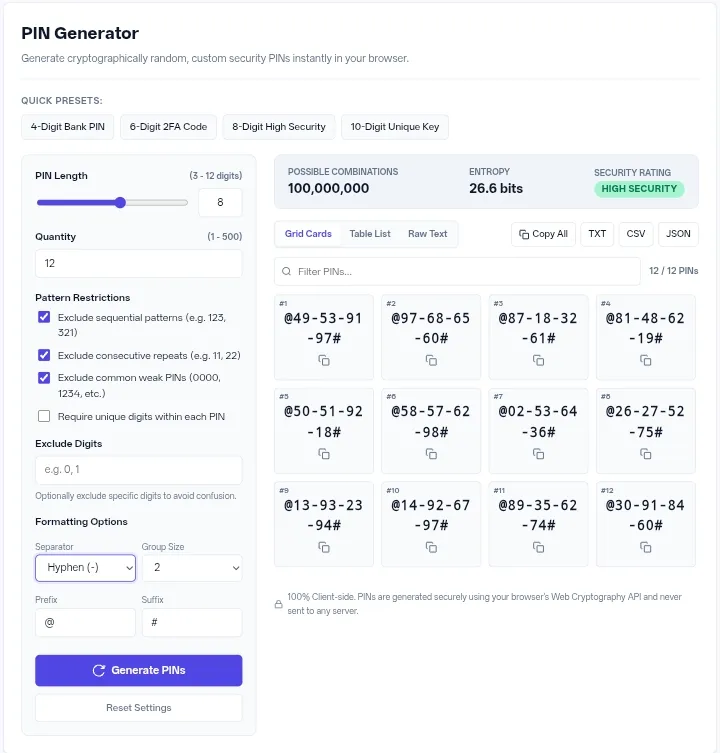
Highly secure access codes Input: Set length to 8 and check Require unique digits within each PIN -> Action: Click generate -> Result: Passcodes where no single digit appears twice, such as “90471536”.
Keep the box to exclude common weak PINs checked whenever possible. This blocks notorious passcodes like “1212”, “2024”, or “2580” (the straight line down a standard number pad) from appearing in your list.
When creating longer codes, apply a space or hyphen separator with a group size of 3 or 4. Breaking up a 12-digit string makes it much easier for people to read and type accurately.
Be careful when typing numbers into the specific exclusion field. Removing too many options drastically lowers the entropy and drops your security rating, making the resulting codes easier to guess.
Everything happens 100% on the client side. The mathematical generation processes strictly inside your device’s browser memory. Your selected settings and the resulting passcodes are never transmitted to any external server or stored in a database.
This generator provides a fast, local way to produce customized numerical codes for testing, authentication, or physical security. Its combination of specific pattern exclusions and instant bulk exporting makes handling large batches straightforward.
This option disables itself automatically if you set the length higher than 10. A standard numeric system only has ten digits (0-9), so an 11- or 12-digit sequence must reuse at least one number.
A red error banner will appear stating you must allow at least two digits to run the generator.
Checking this box stops the creation of passcodes containing ascending or descending chains of three numbers, such as “123” or “876”.
Clicking it clears all your custom formatting, empties the output area, and returns the sliders to 4 digits and 10 codes per batch.
It drops any result where the exact same number sits directly next to itself, preventing outputs like “44” or “99” anywhere in the sequence.