Create a Secure PIN in Seconds with Our PIN Generator
Need a new PIN for an account, device, or personal use? Our PIN Generator creates random…
Need a random token for your website, app, or project? This Security Token Generator creates secure-looking random tokens quickly. Choose the required token length, generate a new token, and copy it when needed.
Whole number from 4 to 256.
Whole number from 1 to 50.
Up to 32 characters, no spaces. Not counted in strength.
Duplicates and whitespace are ignored. At least 2 different characters are required.
Whether you need API keys, session IDs, or password reset links, a Security Token Generator builds cryptographically secure random strings directly in your browser.
Formatting flexibility lets you adapt the output to strict system requirements. You can generate anything from lowercase hexadecimal strings to complex combinations of URL-safe Base64 alphabets, making sure the text fits perfectly into whatever database or application you are building.
Batch processing saves considerable time during testing and development. Instead of clicking a button dozens of times, you can set the quantity up to 50 and instantly receive a bulk list of unique strings, ready for export.
A live statistical readout provides immediate mathematical context for your configuration. Every time you run the Security Token Generator, a dedicated panel displays the exact pool size and calculates the entropy per string, which prevents you from accidentally deploying weak secrets.
Readability controls protect against human error in customer-facing scenarios. By checking the exclude look-alike characters box, you remove visually ambiguous letters and numbers, meaning a person reading the string will not confuse a capital “I” with the number “1” when typing a code manually.
All randomization relies exclusively on your browser’s Web Crypto API, specifically the window.crypto.getRandomValues function. This provides cryptographically secure, uniform selection across your chosen character pool while applying rejection sampling to prevent modulo bias, meaning no character is statistically more likely to appear than another.
The strength of your configuration is calculated using a specific mathematical formula: Entropy = token length x log2(character pool size). The application assigns a human-readable strength rating based on this entropy bit value. Anything below 64 bits registers as Low, 64 up to 95 registers as Moderate, 96 up to 127 registers as Strong, and 128 bits or higher earns a Very strong rating.
Any prefix you append is strictly excluded from these length and entropy calculations. If you request a length of 32 and add a 4-character prefix, the final string will be 36 characters long, but the entropy math only evaluates the 32 randomly generated characters.
The Security Token Generator treats Base64 and URL-safe Base64 strictly as character pools rather than data encoders. It simply pulls randomly from those 64 characters. Consequently, the tool does not pad the end of the text with “=” characters like standard Base64 data encoding typically would. Custom character sets must contain at least 2 distinct characters and max out at 512 different characters.
Standard Database Secret Input: Select Hexadecimal, set Length to 32, and Quantity to 1 -> Action: Click Generate Token -> Result: The application outputs a 32-character string consisting of numbers and lowercase letters (a-f) with exactly 128 bits of entropy and a “Very strong” rating.
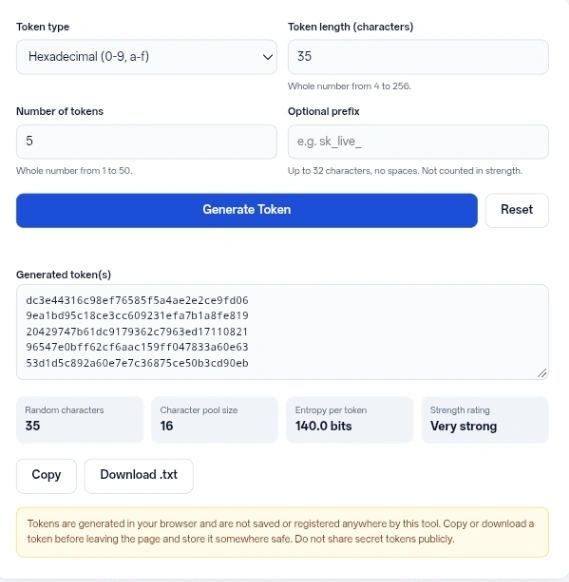
Live API Key Input: Select Alphanumeric (with upper, lower, and digits checked), set Length to 24, and type “sk_live_” into the Optional prefix field -> Action: Click Generate Token -> Result: The tool produces a string starting with “sk_live_” followed by 24 random characters pulled from a 62-character pool, yielding roughly 143.0 bits of entropy.
Temporary Verification Code Input: Choose Numeric (0-9), set Length to 6, and Quantity to 5 -> Action: Click Generate Token -> Result: You receive five different 6-digit PIN codes, each registering about 19.9 bits of entropy (Low rating).
Restricted Format String Input: Pick Custom character set from the dropdown, type “ABCDEF123” into the Custom characters box, and set length to 16 -> Action: Run the Security Token Generator -> Result: The output is a 16-character string constructed entirely from those specific nine letters and numbers.
Always save your work immediately after clicking the generate button. Because the interface holds data temporarily in the text area, refreshing the page or clicking the reset button will permanently erase your strings.
Keep prefixes short and descriptive to make identifying your secrets easier later on. Formats like “test_”, “prod_”, or “dev_” help you recognize the purpose of a string at a glance without inflating the mathematical randomness score of the remaining characters.
When creating coupon codes or event tickets that people need to read aloud, stick to uppercase letters and digits while avoiding symbols. You can further reduce frustration by checking the Exclude look-alike characters (0 O o 1 l I) box.
Avoid combining the maximum length of 256 characters with the maximum batch size of 50 unless you plan to use the download button. Copying massive blocks of text directly from the browser window can sometimes lead to accidental formatting issues when pasting into spreadsheets.
Everything executes entirely within your local browser environment. The JavaScript code relies on your device’s operating system to supply random numbers and does not transmit any generated strings to a remote server.
The application does not store your configurations, generated text, or usage history in cookies, local storage, or external databases. Once you download the text file or copy the strings to your clipboard, the data resides solely on your personal machine.
Because the tool operates without a backend database, it cannot check whether a generated string already exists in your system or cross-reference it against known data breaches.
This Security Token Generator gives developers a purely local, mathematically reliable method for creating random text strings, session IDs, and placeholder secrets. Just make sure to save or download your results immediately, as nothing is permanently stored in the browser.
The prefix field strictly prohibits spaces and line breaks. If you attempt to include a space, the interface will block the generation and display an error to prevent formatting problems in your final text.
No, it only acts as a dictionary. The tool pulls random characters from the standard Base64 alphabet (A-Z, a-z, 0-9, + and /) to build a string. It cannot read existing files, and it does not apply the standard “=” padding to the end of the text.
The script automatically strips out duplicate characters and blank spaces from your custom input. If you type “AABB CC”, the application evaluates your available character pool as simply “ABC”.
A pool containing only one character has zero entropy because the outcome is entirely predictable. The mathematics behind the randomness require at least two distinct options to make a mathematically valid choice.
The code requires a modern browser environment that supports the Web Crypto API. If your browser lacks this feature, the tool refuses to run entirely rather than falling back on mathematically weak randomization methods.
No. The interface resets entirely upon refreshing or closing the tab. Every time you load the page, all settings revert to a length of 32, a quantity of 1, and a hexadecimal format.