See How Your Money Can Grow with a Compound Interest Calculator
Want to know how much your savings or investment could grow over time? Use our Compound Interest Calculator to estimate the interest earned and final amount by entering your starting amount, interest rate, and investment period.
Compound Interest Calculator
$
$
%
Yrs
Future Value
$0.00
Initial Investment
$0.00
Total Contributions
$0.00
Total Interest
$0.00
Year
Total Contributions
Earned Interest
End Balance
How to Use
Enter your starting amount in the Initial Investment field or drag the slider beneath it.
Type a repeating deposit value into the Monthly Contribution field or adjust its slider.
Set your expected percentage yield using the Estimated Interest Rate (Annually) input or range bar.
Choose how long your money will grow by typing a value into Years to Grow or sliding the bar.
Select a compounding schedule from the Compounding Frequency dropdown menu.
Click the Calculate button to update the figures, or click Reset to restore default values.
Features / Benefits
Dual input controls let you type exact numbers or use visual sliders that update calculations in real-time.
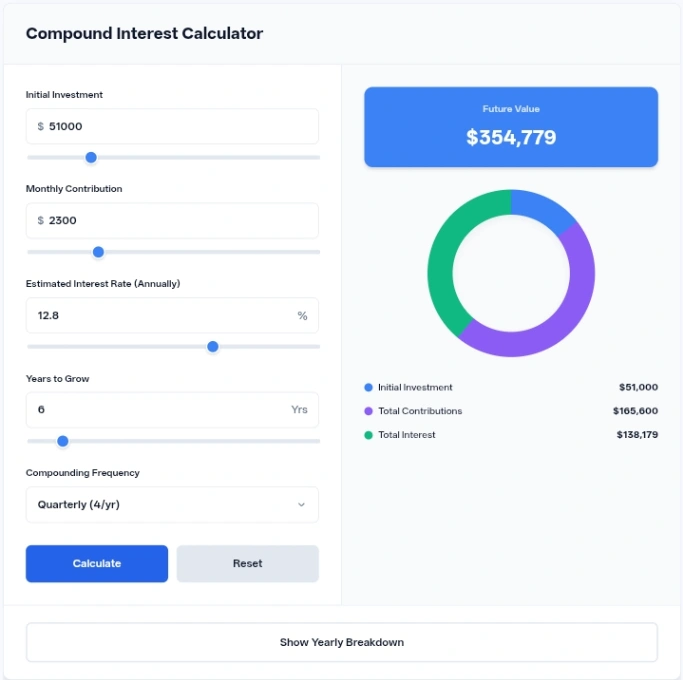
A dynamic visual breakdown chart instantly reveals how your initial principal, ongoing deposits, and total returns split over time.
A collapsible yearly breakdown table lays out milestone figures for contributions, earned interest, and end balances year by year.
Five compounding options handle annual, semi-annual, quarterly, monthly, or daily schedules.
Detailed Information
Financial forecasting relies on compounding, where returns generate their own earnings over consecutive periods.
The calculator processes input figures using an effective monthly rate derived from your chosen compounding frequency. When you adjust any number, the script recalculates future balances, total invested sums,
and interest yields instantly inside your browser. The minimum value for years is one, while the upper bounds on input fields accept larger values,
automatically expanding slider ranges if typed numbers exceed default maximums.
Default values in the Compound Interest Calculator: $10,000 plus $500 per month at 7.5% for 10 years, compounded monthly, grows to $110,086.
Common Uses / Examples
Initial Investment: $5,000 -> Monthly Contribution: $200 -> Estimated Interest Rate: 6% -> Years to Grow: 5 -> Compounding Frequency: Monthly yields a final total breakdown showing your starting capital, total added deposits, and net earnings.
Initial Investment: $25,000 -> Monthly Contribution: $0 -> Estimated Interest Rate: 8% -> Years to Grow: 20 -> Compounding Frequency: Annually tracks long-term lump-sum growth without ongoing additions.
Initial Investment: $0 -> Monthly Contribution: $1,000 -> Estimated Interest Rate: 5% -> Years to Grow: 15 -> Compounding Frequency: Daily calculates the accumulation curve of steady monthly savings.
Tips / Best Practices
Test higher compounding frequencies to see how shifting from annual to daily compounding affects long-term returns.
Compare a higher initial investment against a higher monthly contribution to find which strategy suits your budget.
Open the yearly breakdown table to examine exactly when your earned interest begins outpacing your yearly contributions.
Use the reset button to quickly return all parameters to their default starting baseline when experimenting with new scenarios.
Privacy & Security
Calculations run entirely inside your browser using client-side JavaScript. No entered financial figures or personal inputs are transmitted to external servers or stored in cookies.
Conclusion
This calculator provides a straightforward way to project financial growth based on variable contributions and timelines. By combining visual charts with detailed schedules, it helps map out potential monetary outcomes clearly.
FAQ
What happens if I type a number that is higher than the slider maximum?
The script automatically adjusts the range input’s maximum attribute to match your typed value so the slider stays functional.
Can I set the years to grow to zero?
The years input enforces a minimum value of one, preventing zero-year calculations.
Where does the breakdown table appear when opened?
Clicking the toggle button unhides a scrollable table directly beneath the main calculator grid.
Are negative numbers allowed in the input fields?
Negative values for years and interest rates are automatically corrected to zero during processing.
How do I switch back to default numbers after changing everything?
Clicking the reset button immediately restores all fields to their original default values.
What does the doughnut chart display?
The chart visually proportions your initial investment, total contributions, and total interest into a single color-coded ring