Solve Math Problems Faster with Our Scientific Calculator Online
Need to work with advanced math calculations? Our Scientific Calculator helps you solve trigonometry, logarithms, powers,…
Planning a loan becomes easier when you know your monthly payment in advance. Our EMI Calculator lets you enter the loan amount, interest rate, and loan period to quickly see your estimated monthly EMI, total interest, and overall repayment amount.
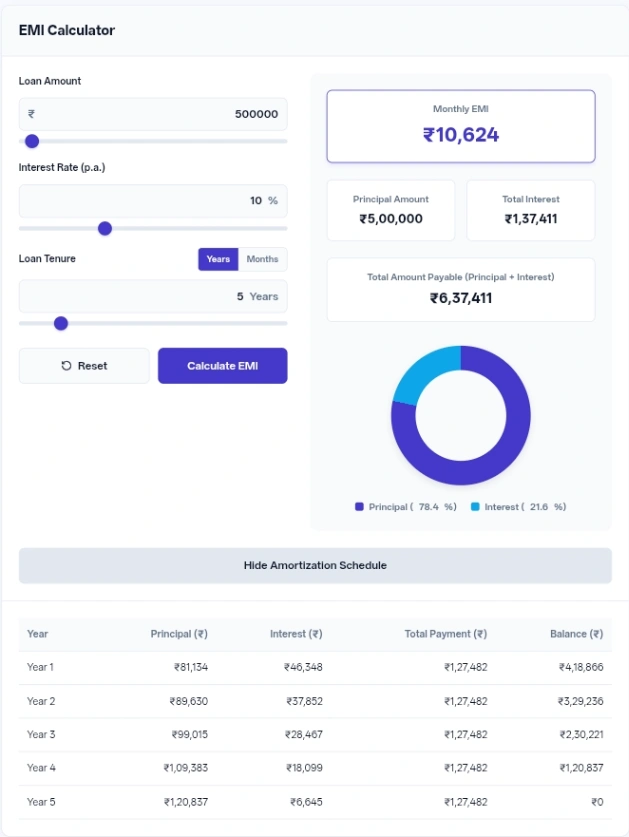
| Year | Principal (₹) | Interest (₹) | Total Payment (₹) | Balance (₹) |
|---|
Figuring out exactly how much a loan will cost you every month is the main job of this EMI calculator.
The interface links the text boxes directly to the sliders below them. You can drag a slider to get a rough feel for different amounts, and the text box updates instantly. Conversely, typing a specific number moves the slider to the correct position.
A toggle switch makes changing the loan duration fast. If you enter 2 under the years setting and then switch to months, the interface automatically converts your input to 24 months.
A color-coded donut chart provides a visual breakdown of your payments. It assigns one color to the principal and another to the interest, updating automatically so you can see what percentage of your money goes toward the actual loan versus bank fees.
If you want to start a new scenario from scratch, a Reset button restores the default inputs—a ₹5,000,000 loan at 8.5% for 20 years—and hides the payment schedule table.
This calculator uses the standard banking math for Equated Monthly Installments. It assumes the interest is compounded monthly based on the annual percentage rate you provide.
The principal amount field requires a minimum of ₹1,000. The slider visually stops at ₹20,000,000, but the text box accepts manual typing up to a strict maximum of ₹100,000,000. When you type a number higher than the default slider limit, the slider dynamically increases its own maximum to match your typed amount.
The interest rate accepts values from 1% up to 30%, adjustable in increments of 0.1%. If you somehow manage to enter a 0% interest rate, the logic bypasses the complex formula and simply divides the total principal evenly by the total number of months.
Duration is restricted to a range of 1 to 30 years, or 12 to 360 months. If you leave a text box empty, enter a negative number, or type a value outside the permitted ranges, the calculation stops. The interface will then display a red warning text below the incorrect field.
Input: Leave the default settings as they are: Loan Amount ₹5,000,000, Interest Rate (p.a.) 8.5%, and Loan Tenure 20 Years. Action: Click Calculate EMI. Result: The output shows a Monthly EMI of ₹43,391 and a Total Interest cost of ₹5,413,878.
Input: Loan Amount ₹800,000, Interest Rate (p.a.) 9%, and Loan Tenure 5 Years. Action: Type the numbers into the respective fields and click to calculate. Result: The summary updates to show a Monthly EMI of ₹16,607, with a Total Amount Payable (Principal + Interest) of ₹996,391.
Input: Loan Amount ₹50,000, Interest Rate (p.a.) 12%, and Loan Tenure 12 Months. Action: Click the Months toggle, type in the short-term loan details, and generate the result. Result: The cards display a Monthly EMI of ₹4,442 and a Total Interest of ₹3,309.
Pay close attention to the donut chart when comparing different loan lengths. Extending a repayment plan from 15 to 20 years lowers the monthly burden, but the chart will clearly visualize the interest slice growing significantly larger against the principal.
Open the payment schedule table to examine the “Year 1” and “Year 2” rows before agreeing to a loan. You will notice that early in the repayment phase, a surprisingly large portion of your money goes toward interest rather than reducing your actual balance.
If a lender quotes a duration like 18 months, rely on the months toggle rather than trying to calculate fractional years. Sticking to whole numbers in the correct category prevents rounding errors in your planning.
All mathematical processing happens entirely inside your web browser using JavaScript. No financial data, loan amounts, or personal interest rates are sent to an external server. The interface does not use cookies or local storage to save your numbers, meaning all your calculations disappear completely the moment you close or refresh the page.
Planning your finances requires knowing the true price of borrowing money over time. This tool removes the guesswork by breaking down exact monthly costs and long-term interest payments before you sign any paperwork.
Longer loans accumulate interest over many more months. The underlying math means you pay the lender for the privilege of holding their money longer, which drastically increases the total interest charged over three decades.
Yes. While the slider handle stops at ₹20,000,000, clicking into the text box lets you manually type larger numbers up to ₹100,000,000.
No. To keep the screen clean and prevent endless scrolling, the table groups your payments. It shows the total principal paid, total interest paid, and remaining balance at the end of each full year.
The text boxes are programmed strictly as numeric inputs. The web browser will physically prevent you from typing letters or special symbols, which keeps the mathematical formulas from breaking.
This red warning appears if you clear the box entirely, type a zero, or enter a negative number. The calculator requires a positive numerical value to execute the math.