Solve Math Problems Faster with Our Scientific Calculator Online
Need to work with advanced math calculations? Our Scientific Calculator helps you solve trigonometry, logarithms, powers,…
Need to check GST on a product or service? Use our GST Calculator Online to quickly calculate the GST amount, total price, and price before or after tax. Just enter the amount and GST rate to get clear results in seconds.
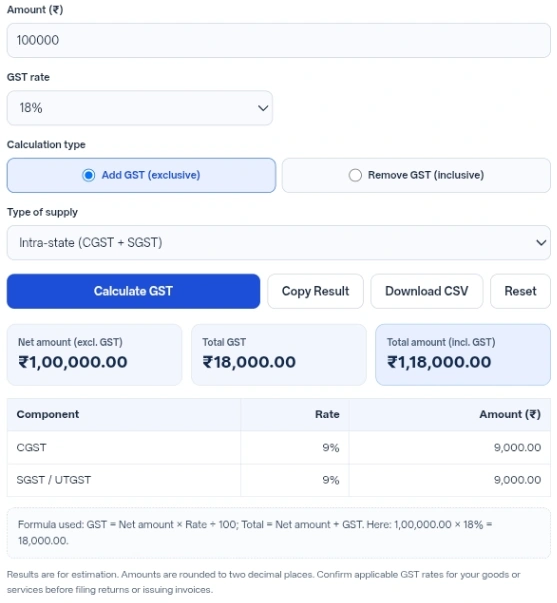
| Component | Rate | Amount (₹) |
|---|
Results are for estimation. Amounts are rounded to two decimal places. Confirm applicable GST rates for your goods or services before filing returns or issuing invoices.
Figuring out the exact tax split for a transaction often requires a few steps. This GST Calculator takes an amount in Indian rupees and instantly breaks down the tax components depending on the rate and whether the supply is within one state or between states.”
The ability to pull tax out of a final price saves time when reviewing receipts or setting retail prices. When businesses decide to sell an item for a flat round number, they need to know what portion of that money actually covers the product. The inclusive calculation untangles the base value from the total without manual algebra.
Splitting the tax automatically removes division errors. When local supply is chosen, the application divides the calculated tax between the central and state categories, so you do not have to split it by hand.
Having export buttons right next to the compute button keeps records organized. The spreadsheet download formats the breakdown into neat rows that open in any spreadsheet application, while the copy button grabs a clean plain-text summary that pastes easily into emails, chat messages, or notes.
Displaying the exact math string below the result table creates transparency. The output shows the specific multiplication and division steps used with your exact numbers, helping people understand exactly how the final output was reached rather than just presenting a blind result.
The math engine relies on two distinct formulas depending on your goal. When adding tax to a net amount, it uses: GST = Net amount × Rate ÷ 100, and then adds that to the net to find the total amount. When working backward from a total amount, it finds the net first: Net amount = Total × 100 ÷ (100 + Rate), and then subtracts the net from the total to isolate the goods and services tax.
All final monetary figures are rounded to exactly two decimal places, representing rupees and paise. If you choose an intra-state supply, the central tax (CGST) gets half of the total tax rounded to two decimals, and the state or union territory tax (SGST / UTGST) gets the remainder, so in rare cases the two differ by one paisa. For inter-state supply, the integrated tax (IGST) simply absorbs the entire 100% of the tax amount.
The input field accepts decimals but rejects negative numbers. If you try to calculate a value over 10,000,000,000,000, the system triggers a warning that the number is too large to calculate accurately. Leaving the amount empty shows an error asking you to enter an amount. The field is a number field, so most browsers will not accept letters in it. If you select the custom option but leave the percentage blank, the script stops and asks you to provide a custom rate.
Input ₹10,000 -> Action: Select 18% rate, Add GST (exclusive), and Intra-state (CGST + SGST), then calculate -> Result: The net amount is ₹10,000.00. Total GST is ₹1,800.00. The breakdown shows CGST at 9% (₹900.00) and SGST / UTGST at 9% (₹900.00). The total amount is ₹11,800.00.
Input ₹11,800 -> Action: Select 18% rate, Remove GST (inclusive), and Inter-state (IGST), then calculate -> Result: The total amount is set to ₹11,800.00. The net amount becomes ₹10,000.00. Total GST is ₹1,800.00, fully assigned to IGST at 18%.
Input ₹5,000 -> Action: Select Custom rate, type 7.5, pick Add GST (exclusive) and Intra-state (CGST + SGST), then calculate -> Result: Net amount is ₹5,000.00. Total tax is ₹375.00, split into CGST (3.75%) at ₹187.50 and SGST / UTGST (3.75%) at ₹187.50. The total reaches ₹5,375.00.
Pressing the Enter key while your cursor is in the amount or custom rate field will instantly trigger the math, saving you a mouse click.
if you are ever confused about whether you added or removed the tax. It explicitly states the exact numbers being multiplied and divided.
Clicking the copy or download buttons on a blank form will only trigger an error notification.
Use the inclusive setting when you know the final budget for a purchase and need to figure out how much of that money is paying for the product versus going to the government.
All processing happens directly in your browser through JavaScript. The tool’s code does not send your monetary values, selected rates, or supply choices to any external server. No financial data is saved, tracked, or collected by the code itself.
Breaking down tax components takes only a few seconds when the formulas are handled automatically. Getting the central and state splits right helps keep your estimates clear and consistent. Always confirm the applicable GST rate before using the figures in an invoice.
You have to click the primary button to generate a valid output first. The system will tell you to “Calculate a result first, then copy it.”
The amount box is a number field, so most browsers do not let you type letters in it. If the box is empty, the tool shows “Please enter an amount.” and does not calculate.”
No, the system strictly performs arithmetic. You are responsible for knowing and selecting the correct tax tier for your specific goods or services.
Yes. The custom field accepts decimals, so you can type numbers like 4.5 or 12.25 as long as they stay between 0 and 100.
The spreadsheet creates a basic table named “gst-calculation.csv”. It contains rows for your calculation type, chosen percentage, supply type, net figure, individual tax splits, total tax, and final amount.
No. The logic only computes standard goods and services tax components and does not include extra cess layers.